In this guide, you’ll learn how to use a FreeRTOS Mutex with the ESP32 programmed with Arduino IDE. A Mutex (Mutual Exclusion) is a special type of binary semaphore that controls access to shared resources between two or more tasks. This guarantees that only one task can access a critical resource at a time. We’ll explain the basics of a Mutex and show you a simple example of how to implement them.

New to FreeRTOS? Start with this tutorial: ESP32 with FreeRTOS (Arduino IDE)—Getting Started Guide: Creating Tasks.
Table of Contents
In this tutorial, we’ll cover the following subjects:
Introducing Mutexes
A mutex is a special type of binary semaphore (check our tutorial about semaphores) used to control access to a resource shared between two or more tasks. It is created with xSemaphoreCreateMutex() and ensures that only one task can use the resource at a time.
The term “mutex” stands for “MUTual EXclusion,” and it works like a token that allows whichever task holds the token to access the shared resource safely. To use a mutex, a task must first “take” it with xSemaphoreTake(mutex, timeout) to become the token holder and enter the critical section (the code that accesses the resource). When the task finishes, it “gives” the mutex back with xSemaphoreGive(mutex), unlocking it for other tasks. Only then can another task take the mutex and access the resource without conflicts.
The following diagram shows how it works.
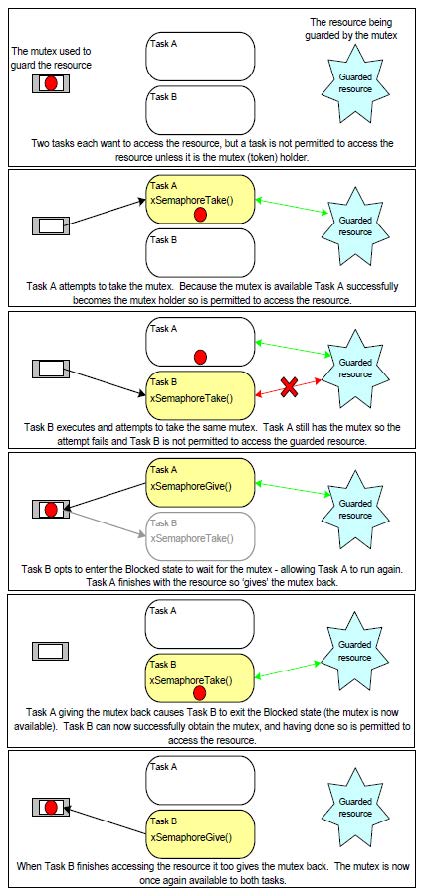
ESP32 Scenarios
For example, imagine a scenario where two tasks are making HTTP requests to save data to a database. Without a mutex, both tasks might try to access and write to the database at the same time, risking data corruption because one task starts a new HTTP request before the other finishes. With a mutex, you can guarantee that only one task accesses the database at a time, ensuring safe, sequential operations.
This concept applies to many scenarios, such as shared access to the Serial port by multiple tasks, the I2C bus for sensors and displays, multiple tasks reading from the same sensor, multiple tasks writing data to the same display, etc.
Mutex and Priority Inheritance
In FreeRTOS, when a task holds a mutex, it keeps control of the shared resource until it releases the token. If a low-priority task is holding the mutex and a high-priority task tries to take it, the high-priority task will be forced to wait. This situation is called priority inversion because a low-priority task is effectively blocking a higher-priority one from running.
To handle this, FreeRTOS implements priority inheritance. When a high-priority task is waiting for a mutex held by a lower-priority task, the lower-priority task temporarily “inherits” the higher priority. This allows it to finish its work and release the mutex sooner, reducing the delay for the high-priority task. Once the mutex is released, the task’s priority returns to its original level.
So, in summary:
- Priority inversion happens when a low-priority task holds a mutex and blocks a high-priority task that needs it.
- The high-priority task can’t run until the low-priority task releases the mutex.
- FreeRTOS uses priority inheritance to fix this.
- The low-priority task temporarily inherits the high priority.
- This lets it finish its work faster and release the mutex sooner.
- Once released, the task’s priority goes back to normal.
Finally, another important thing about mutexes is that they should not be used from an interrupt because (quoting FreeRTOS documentation):
- They include a priority inheritance mechanism which only makes sense if the mutex is given and taken from a task, not an interrupt.
- An interrupt cannot block to wait for a resource that is guarded by a mutex to become available.
Application Examples of Mutex Use on ESP32 Projects
The use of FreeRTOS mutexes can be useful for your ESP32 IoT projects. For example:

- Shared Sensor Data: for example, multiple tasks need to read or update the same sensor values.
- Display Output: multiple tasks need to print to the Serial Monitor or to a display. We must ensure that only one task outputs data at a time so that its outputs do not overlap. We’ll take a look at this example in this tutorial.
- Wi-Fi Operations: if different tasks perform HTTP requests, MQTT publishing, or WebSocket communication, a mutex prevents simultaneous access to the same network resource, avoiding connection errors or database corruption.
- Logging data to SD Card or LittleFS: writing to the flash memory or an SD card must be done carefully to avoid corruption. With a mutex, we ensure that one task finishes the operation before the other can start.
Mutex Basic Functions
Here are some basic functions for creating and handling a mutex using the ESP32 with Arduino IDE. We’ll explore these functions in a practical example next.
Creating a Mutex
To create a mutex, use xSemaphoreCreateMutex(). It returns a SemaphoreHandle_t handle or NULL if the creation fails.
Taking a Mutex
To take a mutex (and gain access to the shared resource), use xSemaphoreTake(mutex, timeout). The timeout is the maximum time the task will block waiting for the mutex to become available. Use portMAX_DELAY for the timeout if you want the task to wait indefinitely.
Giving a Mutex
To give the mutex (to release it so that other tasks can access the shared resource), use xSemaphoreGive(mutex), unblocking a waiting task. This should always be called after the critical section to release the resource.
ESP32 Mutex Example: Shared Serial Output
To show you how you can use a Mutex with the ESP32 and how it works, we’ll take a look at a simple shared serial output example. We’ll test the code with and without a Mutex so that you can see how it works.
Here’s the example we’ll run:
- We’ll create two different tasks.
- Each task will print two lines of text to the Serial Monitor, with a small delay between the lines.
- The tasks run at different intervals, so their outputs could overlap.
- We don’t want the overlap to happen.
- By using a mutex, we make sure each task finishes printing its two lines before the other task starts writing.
First, we’ll run the example without a mutex. Then, we’ll run it again using a mutex to show the difference.
Shared Serial Output (Without Mutex)
Upload the following code to your ESP32 board.
/*
  Rui Santos & Sara Santos - Random Nerd Tutorials
  Complete project details at https://RandomNerdTutorials.com/esp32-freertos-mutex-arduino/
  Permission is hereby granted, free of charge, to any person obtaining a copy of this software and associated documentation files.
  The above copyright notice and this permission notice shall be included in all copies or substantial portions of the Software.
*/
void Task1(void *parameter) {
  for (;;) {
    Serial.println("Task1: Logging from Task 1");
    vTaskDelay(1000 / portTICK_PERIOD_MS);
    Serial.println("Task1: End of log from Task 1");
    vTaskDelay(5000 / portTICK_PERIOD_MS);
  }
}

void Task2(void *parameter) {
  for (;;) {
    Serial.println("Task2: Logging from Task 2");
    vTaskDelay(800 / portTICK_PERIOD_MS);
    Serial.println("Task2: End of log from Task 2");
    vTaskDelay(3000 / portTICK_PERIOD_MS);
  }
}

void setup() {
  Serial.begin(115200);
  delay(1000);
  Serial.println("Starting FreeRTOS");

  xTaskCreatePinnedToCore(
    Task1,                  // Task function
    "Task1",                // Task name
    3000,                   // Stack size
    NULL,                   // Task parameters
    1,                      // Priority
    NULL,                   // Task handle
    1                       // Core ID
  );

  xTaskCreatePinnedToCore(
    Task2,                  // Task function
    "Task2",                // Task name
    3000,                   // Stack size
    NULL,                   // Task parameters
    2,                      // Higher priority
    NULL,                   // Task handle
    1                       // Core ID
  );
}

void loop() {

}
This code creates two tasks. Both write two lines of text to the Serial Monitor.
Here’s one task:
void Task1(void *parameter) {
  for (;;) {
    Serial.println("Task1: Logging from Task 1");
    vTaskDelay(1000 / portTICK_PERIOD_MS);
    Serial.println("Task1: End of log from Task 1");
    vTaskDelay(5000 / portTICK_PERIOD_MS);
  }
}
And here’s the other:
void Task2(void *parameter) {
  for (;;) {
    Serial.println("Task2: Logging from Task 2");
    vTaskDelay(800 / portTICK_PERIOD_MS);
    Serial.println("Task2: End of log from Task 2");
    vTaskDelay(3000 / portTICK_PERIOD_MS);
  }
}
Now, after uploading the code, press the ESP32 RST button and open the Serial Monitor.

You’ll see that one task can print its output while the other is still running, causing their outputs to overlap. This example demonstrates what can happen in similar situations, such as printing data to a display or writing to a database. To prevent this, we can use a mutex—see the following example.
Shared Serial Output (With Mutex)
This example works the same way as the previous one, but now we use a mutex so one task can’t run until the other releases it.
Here’s the code to upload to the ESP32:
/*
  Rui Santos & Sara Santos - Random Nerd Tutorials
  Complete project details at https://RandomNerdTutorials.com/esp32-freertos-mutex-arduino/
  Permission is hereby granted, free of charge, to any person obtaining a copy of this software and associated documentation files.
  The above copyright notice and this permission notice shall be included in all copies or substantial portions of the Software.
*/
#define MUTEX_TIMEOUT 5000  // 5s timeout

SemaphoreHandle_t serialMutex = NULL;

void Task1(void *parameter) {
  for (;;) {
    if (xSemaphoreTake(serialMutex, MUTEX_TIMEOUT)) {
      Serial.println("Task1: Logging from Task 1");
      vTaskDelay(1000 / portTICK_PERIOD_MS);
      Serial.println("Task1: End of log from Task 1");
      xSemaphoreGive(serialMutex);
    }
    vTaskDelay(5000 / portTICK_PERIOD_MS);
  }
}

void Task2(void *parameter) {
  for (;;) {
    if (xSemaphoreTake(serialMutex, MUTEX_TIMEOUT)) {
      Serial.println("Task2: Logging from Task 2");
      vTaskDelay(800 / portTICK_PERIOD_MS);
      Serial.println("Task2: End of log from Task 2");
      xSemaphoreGive(serialMutex);
    }
    vTaskDelay(3000 / portTICK_PERIOD_MS);
  }
}

void setup() {
  Serial.begin(115200);
  delay(1000);
  Serial.println("Starting FreeRTOS");

  serialMutex = xSemaphoreCreateMutex();
  if (serialMutex == NULL) {
    Serial.println("Failed to create mutex!");
    while (1);
  }

  xTaskCreatePinnedToCore(
    Task1,                  // Task function
    "Task1",                // Task name
    3000,                   // Stack size
    NULL,                   // Task parameters
    1,                      // Priority
    NULL,                   // Task handle
    1                       // Core ID
  );

  xTaskCreatePinnedToCore(
    Task2,                  // Task function
    "Task2",                // Task name
    3000,                   // Stack size
    NULL,                   // Task parameters
    2,                      // Higher priority
    NULL,                   // Task handle
    1                       // Core ID
  );
}

void loop() {

}
How Does the Code Work?
We start by defining the timeout for the mutex. This is the maximum amount of time a task will wait for the mutex until it returns pdFALSE.
#define MUTEX_TIMEOUT 5000 // 5s timeoutCreate a handle for the mutex. It is the same type of handle used with a regular semaphore. We’re calling it serialMutex.
SemaphoreHandle_t serialMutex = NULL;In the setup(), we create the mutex using the xSemaphoreCreateMutex() function as we’ve seen in the introduction section.
serialMutex = xSemaphoreCreateMutex();
if (serialMutex == NULL) {
  Serial.println("Failed to create mutex!");
  while (1);
}
Still in the setup(), we create our tasks.
xTaskCreatePinnedToCore(
  Task1,                  // Task function
  "Task1",                // Task name
  3000,                   // Stack size
  NULL,                   // Task parameters
  1,                      // Priority
  NULL,                   // Task handle
  1                       // Core ID
);

xTaskCreatePinnedToCore(
  Task2,                  // Task function
  "Task2",                // Task name
  3000,                   // Stack size
  NULL,                   // Task parameters
  2,                      // Higher priority
  NULL,                   // Task handle
  1                       // Core ID
);
Now, let’s take a look at the tasks’ callback functions defined before the setup(). The following line shows Task1, and here we can see how we use the mutex. It uses the same API as semaphores.
void Task1(void *parameter) {
  for (;;) {
    if (xSemaphoreTake(serialMutex, MUTEX_TIMEOUT)) {
      Serial.println("Task1: Logging from Task 1");
      vTaskDelay(1000 / portTICK_PERIOD_MS);
      Serial.println("Task1: End of log from Task 1");
      xSemaphoreGive(serialMutex);
    }
    vTaskDelay(5000 / portTICK_PERIOD_MS);
  }
}
First, we check if we can get the mutex with xSemaphoreTake(). It will until a maximum time of MUTEX_TIMEOUT.
if (xSemaphoreTake(serialMutex, MUTEX_TIMEOUT)) {If we can, we print the lines to the Serial Monitor, which means we enter the critical task (the shared resource).
Serial.println("Task1: Logging from Task 1");
vTaskDelay(1000 / portTICK_PERIOD_MS);
Serial.println("Task1: End of log from Task 1");
Right after printing, since we already finished the critical section, which in this case is accessing the Serial Monitor, we can now release the mutex with xSemaphoreGive(serialMutex).
xSemaphoreGive(serialMutex);In case the MUTEX_TIMEOUT is exceeded while waiting for the mutex, it will proceed to the following line before checking for the mutex again.
vTaskDelay(5000 / portTICK_PERIOD_MS);The callback for Task2 works similarly, but with different timings.
void Task2(void *parameter) {
  for (;;) {
    if (xSemaphoreTake(serialMutex, MUTEX_TIMEOUT)) {
      Serial.println("Task2: Logging from Task 2");
      vTaskDelay(800 / portTICK_PERIOD_MS);
      Serial.println("Task2: End of log from Task 2");
      xSemaphoreGive(serialMutex);
    }
    vTaskDelay(3000 / portTICK_PERIOD_MS);
  }
}
Demonstration
Upload the code to the ESP32. Then, open the Serial Monitor and press the ESP32 RST button so that it starts running the code.

Notice that this time, the second task only starts after the first one finishes printing its output. The mutex prevents the tasks from overlapping. Both tasks want to access the Serial Monitor, but only the task holding the mutex can write to it.
Wrapping Up
In summary, using mutexes is a simple but powerful way to control access to shared resources in your ESP32 projects. Whether you’re printing to the Serial Monitor, updating a display, writing to a file, or sending data over Wi-Fi, updating a database, etc, mutexes help avoid conflicts between tasks in your code.
For more information about FreeRTOS Mutexes, you can check the official documentation.
We hope you’ve found this tutorial useful. If you want to learn more about using FreeRTOS programming with the ESP32 on Arduino IDE, make sure you check our other tutorials in this series:
- ESP32 with FreeRTOS (Arduino IDE)—Getting Started Guide: Creating Tasks
- ESP32 with FreeRTOS Queues: Inter-Task Communication (Arduino IDE)
- ESP32 with FreeRTOS: Getting Started with Semaphores (Arduino IDE)
- ESP32 with FreeRTOS: Software Timers/ Timer Interrupts (Arduino IDE)
- How to use ESP32 Dual Core with Arduino IDE (FreeRTOS)
To learn more about the ESP32, make sure to check out our resources:




Thank you for the Mutex Example
Another place it’s worth having mutual exclusion is between call backs e.g. from the async web server and the code running in loop. I had some mysterious crashes before I added it. I didn’t actually use a mutex for this. What I did do was use a FreeRTOS queue. The call backs write the call back info to that queue, then loop reads the queue in a non-blocking manner.
Hi.
Yes, that’s a great application for FreeRTOS.
Regards,
Sara
Oui, ça manquait !
Merci
Please what is different between this and between this:
boolean a = true;
void Task1(void *parameter) {
for (;;) {
if (a) {
a=false;
Serial.println(“Task1: Logging from Task 1”);
vTaskDelay(1000 / portTICK_PERIOD_MS);
Serial.println(“Task1: End of log from Task 1”);
a=true;
}
vTaskDelay(5000 / portTICK_PERIOD_MS);
}
}
void Task2(void *parameter) {
for (;;) {
if (a) {
a=false;
Serial.println(“Task2: Logging from Task 2”);
vTaskDelay(800 / portTICK_PERIOD_MS);
Serial.println(“Task2: End of log from Task 2”);
a=true;
}
vTaskDelay(3000 / portTICK_PERIOD_MS);
}
}
void setup() {
Serial.begin(115200);
delay(1000);
Serial.println(“Starting FreeRTOS”);
xTaskCreatePinnedToCore(
Task1, // Task function
“Task1”, // Task name
3000, // Stack size
NULL, // Task parameters
1, // Priority
NULL, // Task handle
1 // Core ID
);
xTaskCreatePinnedToCore(
Task2, // Task function
“Task2”, // Task name
3000, // Stack size
NULL, // Task parameters
2, // Higher priority
NULL, // Task handle
1 // Core ID
);
}
void loop() {
}
In your code “boolean a = true;” that should be declared with the voltaile attribute. Without it the compiler may optimise the compiled code so that each task has its own copy of ‘a’ in a register at some points of the task’s code. So if you were unlucky it wouldn’t work as you intended.
Other than that, a quick look over your code suggests to me that your home made mutual exclusion would work. However, using a mutex would stop one task from running when the other task was using the serial output. Whereas in your code both tasks would always be eligible for being run by the scheduler, which would waste some processing power.
I’d say, in summary, that your solution would be fine (with the addition of volatile for ‘a’) for this simple case. For more complex code it would be better, and make the purpose of the code more obvious, if you used the facilities provided by FreeRTOS to manage scheduling and mutual exclusion.
There is also the hypothetical issue of the non-atomic nature of :
if (a) {
a=false;
In theory one task could do the ‘if(a)’ then be descheduled.
Then the other task would run and also see that ‘a’ is true.
So now both tasks think they ‘own’ the serial port.
That’s unlikely to happen, but if you complex code with many instances of this type of non-atomic code, then you might start to encounter occasional, hard to explain, unexpected behaviour.